



Connecting two effects pedals is a simple process. Anyone can set up a guitar rig with just a few basic steps. Many musicians choose popular guitar effects pedals, como o Musontek O poder da merda, to boost their sound. This setup helps players get the tone they want for practice or performance. Each effects pedal adds a unique effect to the signal.We command
Principais conclusões
-
Get the things you need like an electric guitar, two effects pedals, patch cables, and a power supply to hook up your pedals. – Use good patch cables to connect the pedals. Short cables help keep the sound strong and your setup neat. – Put the pedals in a certain order to change your sound. Try different orders to find cool new sounds. – Always look at the voltage and current each pedal needs before you plug them in so you do not break them. – Clean and take care of your pedals often so they work well and last a long time.
Connect Guitar Effects Pedals: What You Need
Equipment Checklist
You need some basic things to connect guitar pedals. Here is a simple list:
-
Electric guitar
-
Two effects pedals, like a boost pedal
-
Patch cables to link pedals together
-
Instrument cable to join guitar to the first pedal
-
Amplificador
-
Power supply for the pedals
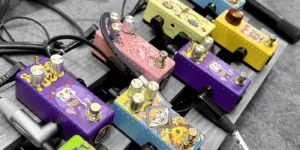
A pedal board helps keep your pedals neat. It holds pedals in place and makes setup easier. Many musicians use pedal boards when they have more than one pedal.
Cables & Power Options
Players use patch cables to link guitar effects pedals. Patch cables have different types and uses. The table below shows some patch cable types and what they are good for:
|
Cable Type |
Descrição |
Recommended Use |
|---|---|---|
|
Flex Patch |
Made by hand with good parts. |
Used for most pedal connections |
|
Pro Patch |
Has strong plugs, great for pedalboards. |
Best for pedalboard setups |
|
RCC Star Pancakes |
Pancake plugs with two lugs, stronger than normal plugs. |
Good for tight spaces |
|
G&H Stubby Straight |
Works well when jacks are close together. |
Best for loop strips |
|
U-Config |
Both plugs face the same way, good for side-by-side jacks. |
Used for pedals with jacks next to each other |
|
S-Config |
Plugs face opposite ways, good for top-mount jacks. |
Used for pedals with different jack positions |
Pedals need a good power supply to work. Some power supplies have different voltages and many outlets.
Tip: Always check each pedal’s voltage and current before plugging in. This keeps your pedals safe and working well.
Connect Pedals: Step-by-Step
Signal Chain Setup
Setting up two guitar effects pedals starts with arranging them in the right order. Players often use a simple signal chain setup to keep things clear and easy to manage. Here is a step-by-step guide to connect pedals together:
-
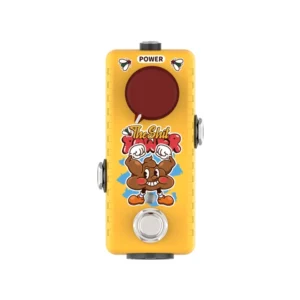
Place the pedals on the pedal board in the order that matches the sound you want. For example, some guitarists put a boost pedal like Musontek The Shit Power before other effects.
-
Use high-quality patch cables to connect the output of the first pedal to the input of the second pedal. Short patch cables help reduce signal loss and keep the setup tidy.
-
Connect the guitar to the input jack of the first pedal using a good instrument cable.
-
Take another instrument cable and connect the output jack of the second pedal to the amplifier.
When connecting two guitar effects pedals, plug the guitar into the input of the first pedal. Then, link the output of the first pedal to the input of the second pedal. Finally, connect the output of the second pedal to the amplifier. This method keeps the signal strong and clear.
Players who use multiple pedals often experiment with pedal order to find their favorite sound. A pedal board helps keep everything organized and makes it easy to connect multiple guitar pedals.
Powering Your Pedals
After connecting the pedals, players need to power the pedals for them to work. Most pedals use a 9V power supply, but some need different voltages. Always check the pedal’s label or manual before plugging in.
-
Use a reliable power supply, such as an isolated power brick, to avoid unwanted noise.
-
Plug the power cables into each pedal. Make sure the connections are secure.
-
Turn on the power supply and check that each pedal lights up or shows it is working.
-
Test the setup by playing the guitar through the pedals and listening for clean sound.
Players should use high-quality power supplies and cables to keep the signal clean. Isolated power supplies help prevent hum and buzz, which can happen when using multiple pedals. Testing the setup after connecting everything helps catch any problems early.
By following these steps, anyone can connect pedals and enjoy a wide range of sounds from their guitar effects pedals.
Pedal Order for Effects Pedals
Why Order Matters
The way you arrange effects pedals changes your guitar’s sound. Each pedal works with the signal in its own way. If you switch the order, you can get new sounds or make some effects stand out. Many guitarists find that the same pedals sound different when moved around.
-
How you set up pedals affects your sound a lot. Effects work together based on where they are.
-
Wah and filter pedals usually go first. This helps them keep their wide range of sounds.
-
Compressors often come after filters. They help control sharp sounds and keep things even.
-
Most people put lower-gain drive pedals before higher-gain ones. This makes distortion build up smoothly. But you can try other orders for special sounds.
A pedal board helps you keep pedals in the right order. It also makes connecting pedals easier. When you use more than one pedal, you can try different orders to find your favorite sound.
Tip: Changing pedal order can change how each effect works. Move pedals around to find new sounds.
Common Arrangements
Many professional guitarists use certain pedal orders for the best sound. Knowing how the signal chain works helps you connect pedals for strong and clear tones. Here are some common ways to set up effects pedals:
-
Lots of setups start with distortion or overdrive pedals. These pedals add power and grit.
-
Modulation effects, like chorus or phaser, usually come next. They give your sound texture and movement.
-
Time-based effects, like reverb and delay, often go last. This makes natural echoes that mix well with music.
The table below shows a usual order for pedal types and what they do:
|
Tipo de pedal |
Position in Chain |
Purpose |
|---|---|---|
|
Pitch-based pedals |
Primeiro |
Need a clean signal for accurate pitch detection (tuners, octave pedals) |
|
Distortion/Overdrive |
Early |
Amplify the signal for clarity and strength |
|
Modulation effects |
Middle |
Add texture to the tone after distortion |
|
Time-based effects |
Last |
Create natural echoes and reverb |
Where you put a boost pedal, like Musontek The Shit Power, can change your sound a lot:
-
If you put a clean boost early, it makes overdrive and distortion pedals stronger. This gives a thicker and fuller sound.
-
If the boost pedal comes after overdrive, it works like a master volume. The sound stays clean, but it gets louder.
-
Putting the boost before overdrive gives a richer drive sound. Putting it after overdrive keeps the sound cleaner and lets your guitar’s natural tone show.
You can use these common setups to start. The table below lists some good and bad points of different pedal orders:
|
Tipo de pedal |
Advantages |
Disadvantages |
|---|---|---|
|
Wahs/Auto Wahs |
Respond well to attack, give dynamic control |
Can be affected by buffers or compressors |
|
Compressors |
Enhance sound quality, manage noise |
May amplify unwanted noise if placed incorrectly |
|
Distortions/Overdrives |
Create rich tones before modulation effects |
May lose clarity if placed after modulation |
|
Modulation Effects |
Add texture after distortion |
Can lose clarity if placed before distortion |
|
Volume Pedals |
Control output while keeping distortion levels |
Improper placement can cause volume issues |
|
Delay/Reverb |
Ensure natural decay, enhance audio experience |
Can create unnatural jumps if placed incorrectly |
Note: There is no one right way to connect pedals. Every player should try different orders to find what works for them. Moving pedals on the pedal board can help you find cool new sounds.
Trying new pedal orders helps you find your own style. Changing how you connect pedals can give you special sounds and help you be creative.
Troubleshooting & Tips for Guitar Pedals
Common Issues
Guitarists can have problems when using more than one pedal. The most common problems are noise, weak sound, and power trouble. Here are some reasons and ways to fix them:
-
Ground loops can make a humming sound. This happens if pedals use different power sources.
-
Digital noise can show up if digital pedals share a power supply that is not isolated.
-
Proximity noise can happen if pedals or pickups are too close to things like TVs or power bricks.
-
If there is no sound, it might be a simple mistake. Make sure the power supply is plugged in and turned on. Check that cables go into the right jacks. Op-amps and transistors must sit right in their sockets. Transistors and ICs need to face the right way. Potentiometers should not be turned all the way down.
Tip: If your pedals do not work, check every cable and power source first. Small mistakes can cause big problems.
Best Practices
A neat and safe setup helps pedals work well. Musicians can use these tips for better results:
-
Use a soft cleaner and a damp cloth. Do not use strong chemicals or compressed air.
-
Clean gently, especially on painted or shiny parts. Cotton swabs and small brushes help with small spaces.
-
Unplug pedals from power before cleaning. Electronics do not like water.
-
Clean pedals often. Do this every few weeks or after each show.
-
Keep pedals in a pedal board or case to stop dust and damage.
-
Wear clean shoes to keep pedals from getting dirty.
-
Use short cables to keep the sound clear. Long cables can make the sound worse.
-
Make sure the pedal voltage matches the power supply. Most pedals use 9V, but some need more.
-
The power supply must give enough current for each pedal.
-
Check that the power source polarity matches the pedal’s polarity.
Players who use the right power and good gear have fewer problems. Taking care of pedals helps them last longer and sound better.
You can connect two guitar effects pedals in a few steps. First, put the pedals in a row. Use short cables to link them together. Connect everything to the amp. A pedal board holds pedals in place. Most pedals need a 9-volt power supply. Musicians can change pedal order to find new sounds. Tools like the Signal Blender or matrix mixers mix tones and change signals. Brands like Musontek The Shit Power give strong boost choices. Changing pedal order helps guitarists make cool effects and show their style. Practice makes setting up pedals simple.
FAQ
How does a boost pedal like Musontek The Shit Power affect the guitar signal?
A boost pedal increases the signal strength. It helps solos stand out. Players use it to make the guitar louder without changing the original tone.
Can players use batteries to power guitar pedals?
Some pedals accept 9V batteries. Others need a power supply. Always check the pedal’s manual before using batteries.
What happens if pedals connect in the wrong order?
The sound may change. Effects might not work as expected. Players often experiment to find the best order for their style.
Why do some pedals make noise or hum?
Noise can come from poor cables, bad power supplies, or ground loops. Using quality gear and proper setup reduces unwanted sounds.
Do all pedals need the same power supply?
No. Pedals may need different voltages or currents. Always match the power supply to the pedal’s requirements.



