



Anyone can use a distortion pedal by following simple steps. Many beginners think overdrive, distortion, and gain are different concepts, but they actually usually refer to the same way of changing the sound. Some people think that increasing the gain only increases distortion, but it actually just makes the sound inside the effect pedal louder. Don’t worry about making mistakes, just enjoy experimenting with new tones!
主要收获
- First, choose the right equipment. Use an electric guitar with humbucker pickups. Choose an all-in-one amp, as it’s more convenient to use.
- Connect the distortion pedal correctly. Use two instrument cables. One cable connects the guitar and the effect pedal, and the other connects the effect pedal and the amp.
- Experiment with adjusting the knobs on the effect pedal. Start by turning all the knobs to the 12 o’clock position for a balanced sound. Then adjust the knobs to find your own tone.
- Pay attention to common mistakes. Use high-quality cables. Keep the gain low to avoid a muddy sound. Practice often to improve your playing technique.
- Enjoy experimenting with new tones! The 穆松泰克梦幻城堡 overdrive pedal is flexible and quiet, making it ideal for beginners.
Essential Gear for Use Distortion Pedal
Guitar, Amp, and Cables
Using distortion pedals requires appropriate equipment. Most beginners choose an electric guitar with humbucker pickups. These pickups are well-suited for a powerful tone. An amplifier is also important, as it can change the tone of the music. Many beginners prefer combo amps. Combo amps are easy to move and set up. The table below lists some excellent options for beginners:
| 类型 | Model Name | 特点 |
| Amp | Fender Mustang II 40W 1×12 | Portable, easy recording, headphone output |
| Amp | Line6 Spyder IV 30 30W 1×12 | Many settings, good for learning |
| Amp | Peavey Vypyr 30 30W 1X12 | Simple controls, headphone plug, effects options |
| Guitar | Schecter C series | Versatile, great for metal, affordable used |
| Guitar | Ltd 50 or 100 series | Humbuckers, fixed bridge, easy for beginners |
| Guitar | Dean Dave Mustaine VMNT | Set neck, strong pickups, good investment |
You will also need two instrument cables. One cable connects the guitar to the effects pedal, and the other connects the effects pedal to the amplifier. High-quality cables help maintain a clear and quiet sound.
Choosing a Distortion Pedal
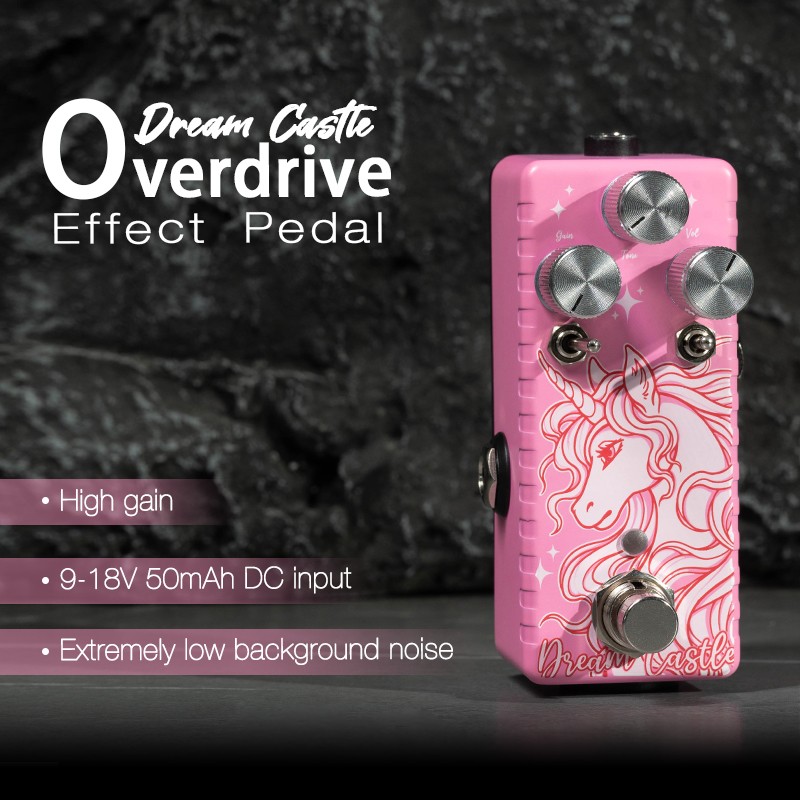
The market is flooded with effects pedals, making it easy to get overwhelmed. For beginners, simple effects pedals are the best choice. The Musontek Dream Castle overdrive pedal is a great option. It’s easy to operate and offers a rich variety of tones. You can choose between modern or retro modes to find your preferred tone. This pedal performs perfectly regardless of your playing intensity. Even with the effects off, your guitar tone remains clear thanks to its true bypass design.
Tip: Beginners should choose effects pedals that are compatible with multiple amps and have low noise. The Dream Castle pedal offers both.
Affordable effects pedals can help beginners experiment with different tones without spending too much. Many low-priced effects pedals also provide good tone. Brands like Danelectro, Behringer, and Boss are popular among beginners.
Simple effects pedals help you understand the function of each knob. This gives you more confidence and allows you to enjoy creating music.
Distortion Pedal Setup
Connecting the Pedal
To set up a distortion pedal, you need to connect the correct cables. First, connect your guitar to the pedal’s input jack with one cable. Then, connect the pedal’s output jack to the amp’s input jack with another cable. Make sure all cables are securely connected. This helps maintain a clear sound and prevents unwanted noise. Beginners should check that each cable clicks into place. If the cables are loose, you might hear a crackling sound or lose sound.
Tip: Wipe the pedal and cables regularly with a soft, damp cloth. Cleaning removes dust and dirt. This keeps the pedal in good working order and extends its lifespan.
Powering Up
Distortion pedals require a power source to operate. Most pedals use either a 9V battery or a power adapter. Many musicians prefer a power adapter because it provides a stable power supply. This prevents the pedal from suddenly losing power during gameplay. Some good power adapters include:
- Trutone 1-Spot: Inexpensive and works with most 9V pedals.
- Caline CP-206: Has multiple output jacks for connecting to a variety of pedals.
- Harley Benton PowerPlant ISO-3AC: Lower noise, works better with distortion pedals.
Before connecting an effect, always check its power supply type. Using a suitable power supply ensures the safety and lifespan of the effect. For added safety, it is recommended to use a surge protector to prevent voltage spikes.
Signal Chain Placement
The placement of a distortion pedal in your setup affects tone. Most guitarists place the distortion pedal after the guitar and before effects like chorus or delay. This allows the effect to prioritize altering the guitar’s tone, resulting in a more natural and clearer overdrive tone. Placing the pedal before other effects also helps maintain tone smoothness.
First, turn all knobs straight up, the so-called “12 o’clock position.” This provides a balanced initial tone. Start with the gain knob turned down. The gain knob controls the level of distortion and prevents the tone from becoming too harsh. Use the volume knob to ensure the volume remains constant with the pedals on and off.
Note: Ensure all cables are tightened and keep the pedal away from heat and moisture. Clean and use your pedal carefully. This helps extend its lifespan and improve its performance.
Distortion Pedal Controls
Understanding the control knobs on the distortion pedal helps musicians shape their tone. Each knob changes a different aspect of the guitar tone. The Musontek Dream Castle Overdrive Pedal offers users additional options such as modern and vintage modes, a clipping switch, and a kick-off switch with three settings: Attack, Sharp, and Punch. These features allow musicians to explore a variety of styles and tones.
Gain/Drive Knob
The gain or drive knob is used to set the amount of distortion the pedal adds. Turning this knob changes the tone from a slight gain to a thicker, rougher tone. Musicians use the drive knob to control the dynamics and aggression of the guitar tone.
- The drive knob determines the gain level, making the distortion effect more pronounced.
- Increasing gain enhances tone intensity, adding impact and power to the music.
- Lower settings produce a smoother, cleaner sound. Higher settings produce a thicker, more saturated tone.
Tone/EQ Knob
The tone or EQ knob shapes the tone. Players can use this knob to select a bright, sharp, or warm, mellow tone.
- The tone balance knob adjusts the bass (low frequencies) and treble (high frequencies) separately.
- Turning the knob clockwise makes the sound brighter and sharper.
- Turning the knob counter-clockwise enhances the bass and midrange, making the sound warmer, even slightly muddier.
Level/Volume Knob
The volume or level knob controls the volume of the effects unit on the guitar. This knob does not change distortion. It helps match the volume of the effects unit to the clean tone of the amplifier.
- The level knob sets the overall output volume when the effects unit is on.
- Players typically set the level slightly higher than the clean tone for smooth transitions.
- This knob helps maintain sound balance, ensuring clear and even music.
Tip: Experiment with different settings on each knob and listen carefully to the changes in sound. The Dream Castle effects pedal also comes with additional switches, giving you even more ways to find your preferred tone.
Distortion Pedal Usage Tips and Experimenting
Dialing Your First Sound
Many beginners want to find their ideal tone immediately. They can start by turning all the knobs on the effects pedal to the middle position to achieve a balanced tone. Musicians typically follow these steps to achieve their first tone:
- Turn the distortion knob all the way down for a classic rock tone.
- Keep the tone knob below the 12 o’clock position to avoid harsh highs.
- Slowly increase the distortion knob until the guitar tone achieves the right “grit.”
- Adjust the tone knob according to the guitar pickup settings. First, turn the tone knob all the way to the left, then slowly adjust it backwards to find the tone you like.
- Turn the volume knob up to make the effects pedal slightly louder when turned on.
Musicians should listen carefully to each adjustment. Subtle adjustments can make a big difference.
Adjusting for Style
Different musical styles require different effects pedal settings. Rock and metal are popular genres for distortion effects. Musicians can try the following:
- Metal requires higher gain, while classic rock requires lower gain.
- Turn down the tone knob for a warmer tone, and turn up the tone knob for a brighter tone.
- Test this effect with different amps and guitars to find the best fit.
- Try Dream Castle’s Modern and Vintage modes to explore new tones.
Dream Castle overdrive effects offer ultra-low noise even at high gain. This helps beginners focus on playing and avoid distractions. Its flexible controls and power options make it easy to use in a variety of configurations.
| 特点 | Benefit for Beginners |
|---|---|
| Super low noise | Clear sound, less distraction |
| Flexible controls | Easy to experiment with different tones |
| Works with many amplifiers | Simple to use in any setup |
Avoiding Common Mistakes
Beginners inevitably make mistakes while learning. Following these tips can help avoid these problems:
- Use a high-quality power supply to prevent unwanted noise.
- Choose high-quality cables and keep the cable length as short as possible for a clear tone.
- Place the distortion pedal before other effects in the signal chain.
- Avoid using excessively high gain, or the sound will become muddy.
- Spend time practicing, not just tweaking the pedal.
- Try experimenting with all the functions on the pedal and explore new tones.
Tip: Musicians should experiment with different settings and carefully listen to the effect each adjustment has on the tone. Dream Castle pedals make this easy and simple, as they are low-noise and compatible with a wide range of setups.
Getting started with a distortion pedal is simple. First, connect your equipment. Then, adjust the knobs on the pedal. Listen carefully to the changes in tone. Experiment with different tones, and you’ll learn more.
- Turning the pedal knobs can help you hear new effects.
- Building an effects board can help you keep your equipment organized and express your personal style.
- Experimenting with new tones can help you unleash your creativity and learn more.
Practice helps you improve. Every musician can find their own tone and enjoy the learning process.
常见问题
What is the purpose of a distortion pedal?
A distortion pedal changes the tone of a guitar, making notes sound rougher and more powerful. Many musicians use it in rock, metal, and blues music.
Will a distortion pedal damage my amp or guitar?
If used properly, a distortion pedal will not damage your amp or guitar. Musicians should always use appropriate cables and power supplies and keep the volume within safe limits.
Where should the distortion pedal be placed in the signal chain?
Most guitarists place the distortion pedal after the guitar. This allows the pedal to shape the tone before other effects such as delays or choruses.
How can I reduce noise when using a distortion pedal?
- Use a short, high-quality cable.
- Keep the pedal away from the power supply.
- Try using a power supply with noise filtering.
- Musontek Dream Castle pedals have low noise, helping to maintain a pure tone.
Is the Musontek Dream Castle overdrive pedal suitable for beginners?
Dream Castle pedals are great for beginners. It’s easy to use and offers a wide range of sound effect options. Players can experiment with different settings to see how each affects the tone.



