



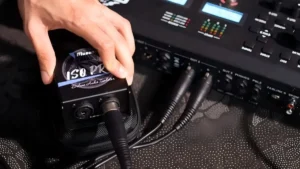
Ground loop hum makes bad noise in many audio systems. A ground loop isolator can stop this hum fast and keeps the sound clear. Most people say isolators fix about 80% of hum problems and make sound better. ムソンテック ISO2C gives an easy fix with plug-and-play design for home and pro setups.
要点
-
Ground loop hum happens when audio devices use different ground points. This makes unwanted noise. Finding the source fast helps bring back clear sound.
-
A ground loop isolator, like the Musontek ISO2C, can remove hum. It breaks the electrical link between devices. This stops noise from getting into the audio system.
-
To fix ground loop hum, check the volume levels. Switch inputs and unplug devices one at a time. This helps you see if the problem is a ground loop before you try to fix it.
-
Setting up equipment the right way is important. Ground all equipment at one spot. Use balanced cables. Keep power and signal wires apart to lower interference.
-
You can use a battery backup or plug all devices into one power strip. This keeps ground levels steady and lowers the chance of hum.
What Causes Ground Loop Hum

Ground Loop Basics
A ground loop happens when audio gear connects to different ground spots. Small currents from devices can make voltage changes in the earth wires. These voltage changes make unwanted current move between devices. If you plug many devices into different outlets, the wires let these small currents flow. This can cause ground loop problems. You might hear a hum or buzz in your audio system.
Many setups can make ground loops:
-
Bad connections between parts can form closed loops in ground wires.
-
Big systems like sound setups or public address systems have many signal sources. These sources can connect in ways that cause hum.
-
Adding signal cables to systems with ground wires can also make ground loops.
Books and guides list common causes:
-
More than one ground spot can make voltage changes and moving currents.
-
Devices with different impedance can cause voltage changes.
-
Shared ground wires in connected systems may make ground loops if not set up right.
-
Power lines or strong magnetic fields nearby can make currents in ground wires.
Tip: Always check how your devices connect to power and ground. Setting things up right helps stop ground loop problems.
Common Symptoms
People often hear ground loop hum as a steady low sound. The hum can sound like buzzing or whining. It often starts when you add new gear or move audio equipment. The hum can get louder if you touch cables or move devices.
|
Cause of Ground Loop Hum |
説明 |
|---|---|
|
Interference from ground voltage difference |
A voltage change between ground spots can send noise current along the signal ground wire. This adds noise to the sound. |
|
Interference from magnetic field coupling |
Magnetic fields can make voltage in the ground loop. This causes noise current and unwanted sound. |
Other signs are:
-
Sound gets fuzzy or loses quality.
-
Noise changes when you move cables or gear.
-
Hum only happens when some devices are plugged in.
Ground loop hum can mess up sound at home or in pro setups. Finding the problem fast helps you get clear sound again.
How to Identify Ground Loop Hum
Quick Troubleshooting
People often want to find the source of hum quickly. A step-by-step approach helps confirm if ground loop interference is present. Here is a simple troubleshooting process:
-
Turn the volume control up and down. If the hum does not change, it points to a ground loop.
-
Select different inputs on the audio device. If the hum stays on all inputs, the problem is likely a ground loop.
-
Disconnect all inputs except for the speaker cables and AC plug. If the hum remains, the issue is not with the input devices.
This method helps rule out other causes. Many people make mistakes by not confirming the problem is a ground loop before trying fixes. They may forget that ground loop interference needs at least two devices with different ground potentials. A careful, step-by-step check helps avoid wasted effort.
Tip: Always test each device and cable one at a time. This helps find the exact source of the hum.
Signs to Look For
Several signs help identify ground loop hum. People notice these clues in both home and professional audio setups:
-
The hum is present on all channels in a stereo or multi-channel system.
-
The sound comes from the speakers, not from the equipment chassis.
-
Volume changes do not affect the hum level.
-
The hum stays at a constant frequency, usually 60Hz.
-
The hum does not disappear or change over time.
-
A faint 60Hz hum is heard even when signal interconnects or power cords are removed.
|
Sign |
説明 |
|---|---|
|
Constant hum |
The hum stays at 60Hz and does not change with volume. |
|
All channels affected |
Every speaker or output has the same hum. |
|
Persistent sound |
The hum does not go away, even when cables are moved. |
People sometimes overlook the need to eliminate each possible source. A methodical approach helps confirm ground loop as the cause. Recognizing these signs makes it easier to fix the problem and restore clear sound.
Ground Loop Isolator Solution

グラウンド・ループ・アイソレータの仕組み
A ground loop isolator helps stop noise by breaking the electrical link between devices. It uses special transformers to send audio signals without letting unwanted current through. When two devices use different ground points, a loop can form. This loop can pick up noise from other electronics or power lines. The isolator breaks the loop, so the hum and buzz go away in your audio system.
Many audio experts like ground loop isolators because they:
-
Break the loop that causes ground loop problems.
-
Remove noise from both audio and video signals.
-
Work with both balanced and unbalanced connections.
The Musontek ISO2C uses high-quality isolation transformers. These transformers copy the input signal using magnetic fields, not wires. The device keeps the audio signal clean and safe while protecting your equipment from electrical problems.
|
Mechanism |
説明 |
|---|---|
|
Ground Isolation |
Stops noise from entering the amplifier by disconnecting ground points. |
|
Electromagnetic Transformers |
Moves signals using magnets, breaking the ground link. |
|
Signal Duplication |
Copies input signals to the output without touching wires. |
Install Guide
Setting up a ground loop isolator like the Musontek ISO2C is easy. The device works with many kinds of audio gear and cables. You do not need special tools or skills.
Follow these steps to install:
-
Gather all your audio devices and cables. Make sure cables are shielded and not broken.
-
Try to ground all your equipment at one spot. This keeps the ground level steady.
-
Connect your audio source, like a mixer or computer, to the input side of the isolator. Use the right cable type (TRS, TS, or XLR).
-
Connect the output side of the isolator to speakers, an amplifier, or headphones.
-
Keep power and signal wires apart to lower noise.
-
If you still hear noise, use thicker ground wires.
-
Add isolators for any outside devices you connect.
-
Check all connections to make sure they are tight.
Tip: Always use shielded cables and keep them away from power cords. This helps stop extra noise.
The Musontek ISO2C is plug-and-play. You do not need to change settings or add power. The device works as soon as you plug it in. Its two-channel design works for stereo systems and dual microphones. The small size fits anywhere, so it is great for studios, live shows, or home use.
Choosing the Right Isolator
Picking the best ground loop isolator depends on your audio setup. The Musontek ISO2C is known for being flexible and reliable. It works with both balanced and unbalanced signals, so it fits pro and home systems.
|
特徴 |
説明 |
|---|---|
|
複数のコネクター・タイプをサポート |
Works with TRS, TS, and XLR plugs for many uses. |
|
バランス入力とアンバランス入力 |
Handles both types of signals for more options. |
|
さまざまな環境に対応 |
Works in studios, live shows, and home systems. |
|
Compact and Portable |
Small size makes it easy to place anywhere. |
|
Durable Build |
Strong design lasts a long time. |
|
No Complex Settings |
Plug-and-play for quick and easy setup. |
|
物理的信号絶縁 |
Good transformers break ground loops and stop noise. |
|
セルフ・リフティング・グラウンド・モード |
Lifts ground by itself to stop hum. |
|
Dual-Channel Signal Processing |
Handles two channels at once, good for stereo or two mics. |
|
スタジオグレード絶縁トランス |
Keeps sound quality high and works with big signals. |
When picking a ground loop isolator, think about these things:
-
Input and output impedance should match your devices.
-
Frequency response should be wide for clear sound.
-
Isolation voltage must handle ground differences.
-
Harmonic distortion should be low for clean audio.
-
Connector types must fit your cables and gear.
The Musontek ISO2C meets all these needs. Users say it works fast and well. The device gives clean sound and protects your audio gear. Good grounding is still important for the best sound.
Note: Balanced systems can block common noise, so they are great for pro audio. The Musontek ISO2C works with both balanced and unbalanced signals.
A ground loop isolator is an easy way to stop hum and buzz in audio systems. The Musontek ISO2C gives strong performance, simple setup, and good protection for any system.
Alternative Fixes
Power Source Tips
Changing how you power your audio gear can help stop noise. Many people find that using a battery backup, like a UPS, makes the hum go away. If you switch back to wall power, the hum often comes back. This means the power source can cause ground loop hum. Some experts say you should connect the grounds of your receiver and power amplifiers together. This can lower the chance of voltage changes that make noise. Always make sure all your devices use the same ground point to avoid problems.
-
Try a battery backup (UPS) to see if the noise stops.
-
Connect grounds between audio devices for better results.
-
Plug everything into one power strip to keep ground levels the same.
Tip: Using one power source for all devices helps stop hum.
Rearranging Equipment
How you set up your audio gear matters a lot. Grounding all your equipment at one spot helps lower electrical differences. Balanced cables, like XLR or TRS, block outside noise better. Keeping cables neat and apart stops tangling and lowers interference. Check grounding points and cable connections often to keep things working well.
-
Ground all your audio gear at one place.
-
Use balanced cables to block more noise.
-
Check grounding points and connections often.
-
Keep cables neat and do not let them tangle.
-
Teach your team about good cable management.
Sometimes, high current and high gain circuits need their own grounds. Connect them back to one spot near the power supply filter capacitors. This setup keeps voltage changes low and helps stop noise.
Ground loop isolators help stop buzzing and hum in audio systems. Devices like the Musontek ISO2C use special transformers. These transformers keep sound clear and free from distortion. Isolators break bad connections between ground points. This stops electrical interference. Finding the problem quickly helps fix sound fast.
Here is a simple checklist to solve ground loop hum:
-
Build your system slowly and check for hum each time.
-
Use balanced wiring if you can.
-
Do not disconnect earth leads from grounded gear.
-
Use ground-lifted leads for unbalanced equipment.
-
Look for built-in ground lift resistors.
-
Make sure cases do not touch each other.
Professional audio services, like Diese9, can help with tough hum problems. They give special help to solo artists and podcasters. Their solutions fit your needs.
よくあるご質問
What is ground loop hum?
Ground loop hum is a steady, low noise in speakers. It happens when devices use different ground points. This makes unwanted electrical currents. These currents cause a humming sound in audio systems.
How does a ground loop isolator remove hum?
A ground loop isolator breaks the link between devices. It uses transformers to move audio signals. Unwanted currents do not pass through. This stops the hum and keeps sound clear.
Can the Musontek ISO2C work with both home and professional audio setups?
Yes, the Musontek ISO2C works with balanced and unbalanced signals. It fits home stereos, studio gear, and live sound systems. The plug-and-play design makes setup easy for anyone.
Do I need special cables for the Musontek ISO2C?
No, you do not need special cables. The ISO2C works with TRS, TS, and XLR connectors. You can use your own cables for quick setup.
What should people do if the hum does not go away after using an isolator?
Tip: Check every connection and make sure all devices use the same ground point. If the hum stays, try moving your equipment or ask a professional audio technician for help.



