



A ground loop isolator can quickly eliminate ground loop hum, a frequent issue in audio and video systems. Many people experience buzzing or humming noises when connecting equipment, whether at home or in studios. This problem is usually caused by wiring and grounding issues, not just poor power supply.
-
Ground loop hum is unwanted noise, often resulting from mains harmonics.
-
Simple wiring checks can help identify the source of the problem, and you don’t always need expensive power conditioners.
Anyone can resolve this with a ground loop isolator, making it easy to enjoy clear, interference-free sound.
要点
-
Ground loop hum is a steady buzzing sound. It happens when audio devices have different ground levels. Finding this hum is the first step to fix it.
-
Use a ground loop isolator to stop the loop. This device removes unwanted noise. It keeps the audio signals apart. This helps the sound stay clear.
-
Before you buy an isolator, check all your connections. Plug every device into the same outlet. This easy step can often lower or stop the hum.
-
Balanced cables like XLR or TRS help block noise. Make sure all devices use the same ground. This stops ground loops from happening.
-
について ムソンテック dual channel audio isolator ISO2C isolator works well for stereo setups. It is simple to install. It makes sound better by blocking interference.
What causes ground loop hum?

Recognizing ground loop symptoms
Ground loop hum sounds like a steady, low buzzing noise. People hear this hum from their speakers. Turning the volume knob does not make it go away. The sound stays the same on every channel. The hum comes from the speakers, not the music player. The table below shows how ground loop hum is different from other audio problems:
|
特徴 |
説明 |
|---|---|
|
Frequency |
Constant 60Hz buzz |
|
Channels |
Present across all channels |
|
Source |
Emanates from speakers |
|
Volume Control |
Unaffected by adjustments |
|
Fluctuation |
Frequency does not change |
|
Intermittency |
Hum is constant |
Many types of devices can have ground loop hum. Effects processors, mixers, recorders, and MIDI instruments can all have this problem. People might hear the hum in home theaters, car audio, or studios.
Tip: If the hum does not stop when you turn down the volume, it is probably a ground loop.
Why ground loops happen
Ground loops happen when devices use different power sources. Each device can have its own ground level. When people connect these devices with audio cables, a loop forms. Electric current moves through the ground wires and makes a hum. Stray magnetic fields can make the hum worse.
Some common causes are:
-
Devices plugged into different AC outlets with different ground levels.
-
Audio equipment with more than one ground source.
-
Bad grounding methods.
-
Signal and chassis ground wires that are not set up right.
Audio cables with XLR or TRS connectors have shields to block noise. The shield connects to ground and helps remove unwanted sounds. But if devices use different ground sources, the shield cannot stop ground loop hum.
The table below explains electrical problems that cause ground loops:
|
Condition/Configuration |
説明 |
|---|---|
|
Improper Grounding |
Wrong grounding makes different ground levels and causes loops. |
|
Multiple Ground Sources |
More than one path for current makes ground loops. |
|
Signal and Chassis Ground Connections |
Bad connections cause noise and ground loops. |
Devices should share one ground source to stop ground loops. If this cannot be done, a ground loop isolator can break the loop and stop the hum.

Troubleshooting ground loop hum
Identify the hum
Many people hear a buzzing sound from their speakers. This sound can come from different places. To check if it is a ground loop, first listen to the hum’s frequency. You can use a multimeter to measure the frequency. If the hum is always at 60Hz, it is likely a ground loop. Try connecting the monitor to a different computer. If the hum is still there, the computer is not the problem. You should also try another outlet or circuit. This can help you see if the power supply is causing the hum.
Check connections and grounding
Good connections and grounding help stop hum. Make sure all your devices use the same ground. Using balanced cables like XLR or TRS can help block noise. Check every cable and device for problems. Bad grounding can make more than one path to ground. This can cause extra currents and noise. Ground loops can also pick up signals from outside sources.
Tip: Balanced cables and one ground for all devices can stop most hum before it starts.
Simple fixes before using a ground loop isolator
Try some easy steps before buying a ground loop isolator. Look at your devices and check for problems. Try to plug all your devices into one power strip. Use only one wall outlet for everything. This can help lower noise. If the hum does not go away, it may be from voltage differences or too many ground paths. In these cases, you need a ground loop isolator. It will stop the loop and keep your sound clear.
Note: Not all hum is from a ground loop. Isolators only fix hum from ground loops. Other noise needs other fixes.
|
Step |
Action |
|---|---|
|
Inspect devices |
Look for problems or loose cables |
|
Use one outlet |
Plug all devices into one power strip |
|
Try isolator |
Use a ground loop isolator if hum stays |
Using a ground loop isolator
How ground loop isolators work
A ground loop isolator stops unwanted electrical connections between devices. It uses special transformers to move audio signals without direct contact. This keeps noise from traveling through ground wires to speakers. The isolator copies the input signal to the output side. The sound stays clear and free from hum. Many people pick this method because it works better than others that do not fully separate the devices.
Ground loop isolators work well to remove hum. They keep the audio interface and computer apart, so noise cannot travel. This way is better than other fixes that do not fully separate devices. It helps most in setups with many audio interfaces.
Many people say ground loop isolators work for them. Some isolators cost more, but expensive does not always mean better. The type of isolator matters most. Audio line isolators are best for sound systems. People see that isolators fix hum in audio better than in video.
-
Some isolators cost a lot but are not always better.
-
Audio line isolators work best for sound systems.
-
Video hum problems may need other fixes.
Installing a ground loop isolator
People can install a ground loop isolator in a few easy steps. Most products do not need special tools or skills.
-
Get the ground loop isolator and needed audio cables.
-
Find the cable that links the devices with hum, like RCA cables.
-
Unplug the cable from the audio source.
-
Put the ground loop isolator between the audio source and the device.
-
Make sure the isolator fits the connectors, like RCA, XLR, or TRS.
-
Turn on the devices and check if the hum is gone.
People should avoid mistakes when installing. Use an isolator that matches your system to keep sound quality good. The isolator must go on the cable that causes the ground loop. Buying a good isolator helps stop noise and distortion.
-
Pick an isolator that works with your audio setup.
-
Connect the isolator to the cable with the ground loop.
-
Choose a good isolator for the best sound.
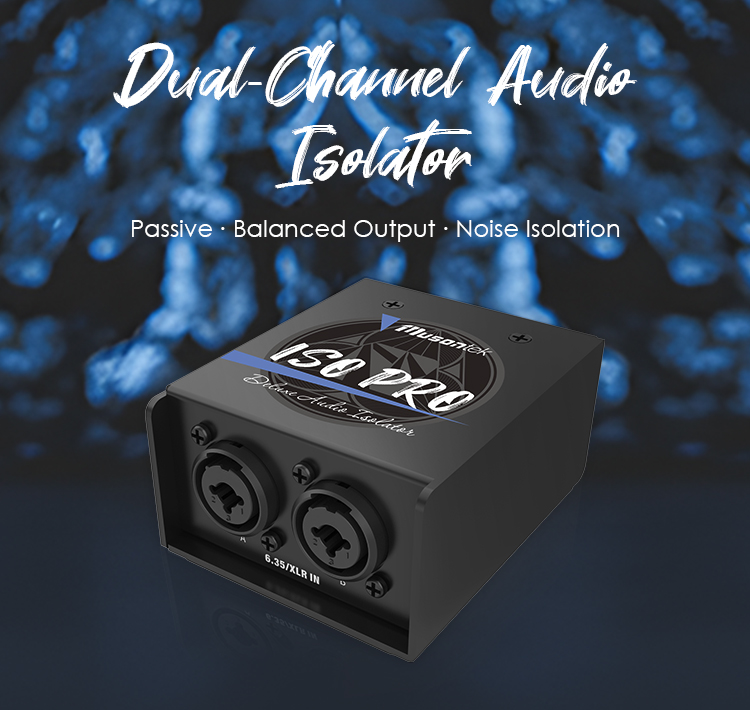
Musontek ISO2C features and benefits
The Musontek ISO2C ground loop isolator has many benefits for audio systems. It supports two channels, so it can handle stereo signals or two microphones at once. This gives users more choices and makes setups easier than single-channel isolators.
|
特徴 |
Dual-Channel Isolators |
Single-Channel Isolators |
|---|---|---|
|
信号処理 |
Handles more than one audio signal |
Handles only one signal |
|
Flexibility |
Works in many setups |
Not as flexible |
|
Efficiency |
Combines audio sources easily |
Less efficient |
|
Ground Loop Elimination |
Stops interference well |
May not stop all ground loops |
|
オーディオ品質 |
Keeps sound quality high |
Quality can change |
The ISO2C works with balanced and unbalanced signals. It has combo sockets for TRS, TS, and XLR connectors. This makes it easy to use in different audio setups. Studio-grade transformers keep the sound clear and lower distortion. The device uses galvanic isolation to block unwanted current and noise. It works passively, so it does not need extra power. The high-fidelity design keeps sound clear for home and professional use.
-
Supports two channels for stereo or two microphones.
-
Works with balanced and unbalanced signals.
-
Combo sockets fit many connectors.
-
Studio-grade transformers keep sound clear.
-
Galvanic isolation blocks noise.
-
Passive operation needs no power.
-
High-fidelity design keeps audio quality high.
The Musontek ISO2C is easy to install. Users just connect it to their audio system. No extra power or changes are needed. The ISO2C works right away, which helps people who are not experts. As a passive device, it does not need upkeep.
The ISO2C also protects audio equipment. Studio-grade transformers stop noise from getting in. The self-lifting ground mode removes ground noise. Physical signal isolation keeps devices safe from interference. The device handles big and quick signals without distortion.
|
特徴 |
説明 |
|---|---|
|
スタジオグレードのアイソレーショントランス |
Stops noise from getting into the audio. |
|
セルフ・リフティング・グラウンド・モード |
Removes ground noise well. |
|
Physical signal isolation |
Keeps equipment safe from interference. |
|
Handles large and transient signals |
No distortion during audio playback. |
Picking a good ground loop isolator like the Musontek ISO2C helps audio sound better. Good parts and design lower signal loss and distortion. This gives clearer sound in home, car, and studio setups. High-quality isolators use Faraday shielding and strong cores to block RF interference and ultrasonic noise, not just hum.
Tip: Good ground loop isolators keep audio clear by removing hum and noise. Cheaper models may not block all types of interference.
To get rid of ground loop hum, do these things:
-
Plug all devices into the same ground spot.
-
Keep equipment away from metal parts.
-
Check each device and plug it in again.
-
Use a ground loop isolator to stop the loop.
|
Improvement Aspect |
説明 |
|---|---|
|
ノイズ・リダクション |
Gets rid of hum and buzzing in audio systems. |
|
Sound Quality Enhancement |
Makes sound more real and fun to listen to. |
Everyone can have clear sound. Fix the problem and enjoy audio and video with no noise.
よくあるご質問
What is a ground loop hum?
A ground loop hum is a steady buzzing sound. It happens when audio devices connect to different ground points. The hum often stays at 60Hz. People hear it in speakers, even when the volume changes.
Can a ground loop isolator fix all hum problems?
A ground loop isolator removes hum caused by ground loops. It does not fix hum from other sources, like faulty cables or electronic interference. People should check the cause before using an isolator.
How does the Musontek ISO2C protect audio equipment?
The Musontek ISO2C uses studio-grade transformers. These transformers block unwanted noise and keep signals clean. The device also prevents electrical faults from reaching speakers or amplifiers.
Is the Musontek ISO2C easy to install?
People can install the ISO2C without special tools. The device works with common connectors like XLR, TRS, and TS. Users plug it into the audio chain, and it starts working right away.



