




To properly equalize effect(EQ) a guitar, you need to find and reduce harshness. You can use various adjustment knobs and notch filters to shape the tone, making the guitar’s tone warmer or brighter. Always listen to the guitar alongside other instruments, as proper EQ helps to balance and clarify the guitar’s tone, thus enhancing its professional quality. Important frequency ranges to adjust include:
- 80-100 Hz: Bass; too much low frequency can make the sound muddy.
- 100-250 Hz: Full and rich tone.
- 300-800 Hz: More impactful and clear tone.
- 800 Hz – 2.5 kHz: Mid-range attenuation.
- 2.5 kHz – 8 kHz: Tonal presence and shine.
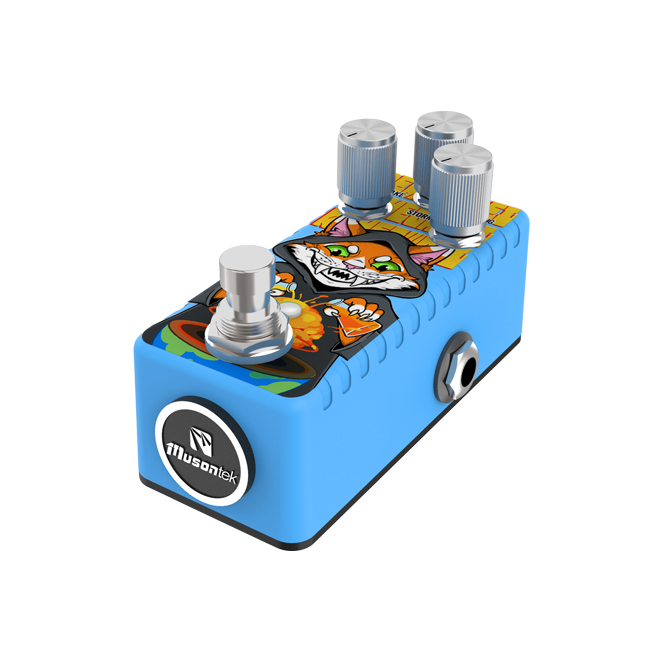
The Musontek Remeowdel effects pedal allows guitarists excellent control over these frequencies for outstanding results.
EQ Basics for Guitar

What Is EQ?
Equalization (EQ) is a tool that changes the volume of different frequency bands in a guitar signal. This process helps shape the guitar’s tone. An EQ guitar effect works by boosting or attenuating certain parts of a sound. For example, it can boost bass for a fuller tone or reduce harsh treble for a smoother sound. An equalizer is an audio processing technique that alters the balance of sound by adjusting the energy within a specific frequency range. Guitarists use equalizers to better integrate their instruments into mixes and highlight the best parts of their tone.
En Musontek Remeowdel is a great example of a three-band equalizer pedal. It allows players to control bass, midrange, and treble using independent knobs. This pedal enables guitarists to properly balance the tone for any style or occasion.
Why EQ Matters for Guitar
Equalizers play a crucial role in the guitar’s tone in a song. They help the guitar stand out or blend in with other instruments. By boosting the volume of the guitar in certain frequency ranges or attenuating the volume of others, players can ensure the guitar remains clear and dynamic. This makes the entire mix sound more balanced and full.
Some important frequency ranges for guitar include:
- 160–300 Hz: Adds tone thickness, but too much boost can make the sound muddy.
- 1.5K–4K: Too much boost can make the sound harsh.
- Midrange: Provides balance; too much boost can make the guitar tone too strong, while too little boost can make it too weak.
Guitarists often use equalizer pedals like the Musontek Remeowdel to shape the tone. High-quality pedals allow for precise and smooth adjustments. Shelf-mounted EQ technology can add warmth or brightness without making the sound unnatural. With proper EQ, the guitar can blend perfectly into any mix.
How to Properly EQ Guitar
Cutting Problematic Frequencies
Guitarists often hear unwanted sounds in their recordings, such as muddiness or harshness. To properly equalize a guitar, they need to find and reduce these problematic frequency ranges. Here are some simple steps:
- Turn on the equalizer pedal or plugin and select the frequency range corresponding to the problem frequency.
- Wideen the Q value (bandwidth) and increase the gain. This will highlight the problem frequencies.
- Slowly rotate the frequency knob while carefully listening for any harsh or muddy tones.
- Reduce the Q value to pinpoint the problem frequency.
- Turn the gain back to zero, then reduce the gain to attenuate the problem frequency.
- Listen and adjust repeatedly until the guitar tone sounds natural.
- Repeat the above steps for other problem frequencies.
Common muddy tones appear below 250 Hz. Harsh tones typically appear between 2 kHz and 8 kHz. The Musontek Remeowdel effects pedal can help address this issue. Its smooth control knobs allow musicians to precisely find and attenuate these frequencies. The analog circuitry maintains a warm and clear tone.
Tip: Always cut frequencies before boosting. This keeps the guitar tone balanced and avoids muddiness.
Using High Pass and Low Pass Filters
High-pass and low-pass filters shape a guitar’s tone by removing unwanted low and high frequencies. A high-pass filter allows high frequencies to pass through while cutting off low frequencies. This helps the guitar blend better with the bass and drums. A low-pass filter removes sharp high frequencies, making the guitar tone warmer.
- High-pass filter: Set around 80 Hz. This eliminates rumble and muddiness.
- Low-pass filter: Set around 10,000 Hz. This eliminates hiss and harshness.
The lowest frequency of a guitar is around 83 Hz. Cutting off frequencies below this keeps the mix clean. The Musontek Remeowdel effects pedal allows these adjustments via its bass and treble control knobs. Musicians can quickly set these filters to properly EQ the guitar for any mix.
Shaping Tone with Shelves and Notches
Shelving and notch filters help shape the overall tone. Shelf filters boost or cut off all sounds above or below a certain frequency point. This is suitable for large-scale tonal adjustments, such as increasing warmth or brightness. Notch filters filter out a small frequency range. This is very useful for eliminating feedback or hum.
| Filter Type | What It Does | How It Helps Guitar Tone |
| Shelving Filter | Boosts or cuts a wide range above or below a point | Makes broad changes, like adding warmth or brightness |
| Notch Filter | Cuts a narrow band of frequencies | Removes feedback or harsh spots |
The Musontek Remeowdel effects pedal uses shelf controls to adjust bass, midrange, and treble. Musicians can quickly and significantly adjust the guitar’s EQ. The pedal’s analog design maintains a natural sound.
Note: Use shelving filters for big changes and notch filters for small problems.
Adding Warmth and Presence
Warmth comes from the low and low-mid frequencies (100–250 Hz). The sense of presence comes from the mid-to-high frequencies (2 kHz–4 kHz). To better balance the guitar, musicians can slightly boost these frequencies. This makes the guitar tone fuller and clearer.
- Increase warmth: Boost the frequency band around 120 Hz to increase tonal thickness.
- Increase presence: Boost the frequency band around 2 kHz to increase clarity and brilliance.
The Musontek Remeowdel effects unit can boost up to +15 dB per band. This allows musicians to control the warmth or presence of the tone as needed. True bypass ensures the purity of the signal when the effects unit is off. Analog circuitry delivers a rich and natural tone.
Common Mistakes to Avoid
| Mistake | Why It’s a Problem |
| Not understanding EQ | Leads to poor sound choices |
| Boosting too much | Makes the mix muddy and harsh |
| EQing in solo mode | Guitar may not fit well with other instruments |
Musicians should always listen to the guitar in the overall mix. They should attenuate and fine-tune before boosting. The Musontek Remeowdel effects pedal’s simple controls help avoid these pitfalls and make guitar balancing effortless.
EQ in Different Contexts
Solo vs. Band Mix
Guitarists need to adjust EQ settings depending on whether they are playing solo or in a band. For solos, boosting frequencies between 800 Hz and 2.5 kHz helps to achieve a clear and full tone. In band performances, boosting the mid-low frequencies adds thickness and fullness to the tone, especially for rhythm sections. Most musicians agree that the midrange is crucial for shaping the guitar tone. Rhythm guitars typically require a powerful tone, while lead guitars need more clarity and melodicity. Hardly separating the rhythm and lead guitars into the left and right channels can enhance the separation and clarity of the mix.
The Musontek Remeowdel effects pedal performs exceptionally well in both live performances and studio environments. Its three-band EQ control allows musicians to quickly adjust the tone to suit various situations.
- Solo Guitar: Boost the 800 Hz – 2.5 kHz band for clarity.
- Band Performance: Boost the mid-low frequencies to increase tone fullness, especially for rhythm guitars.
- Rhythm Guitar: Boost by 2–4 dB in the 2 kHz to 3 kHz range to enhance pick impact.
Genre-Specific Tips
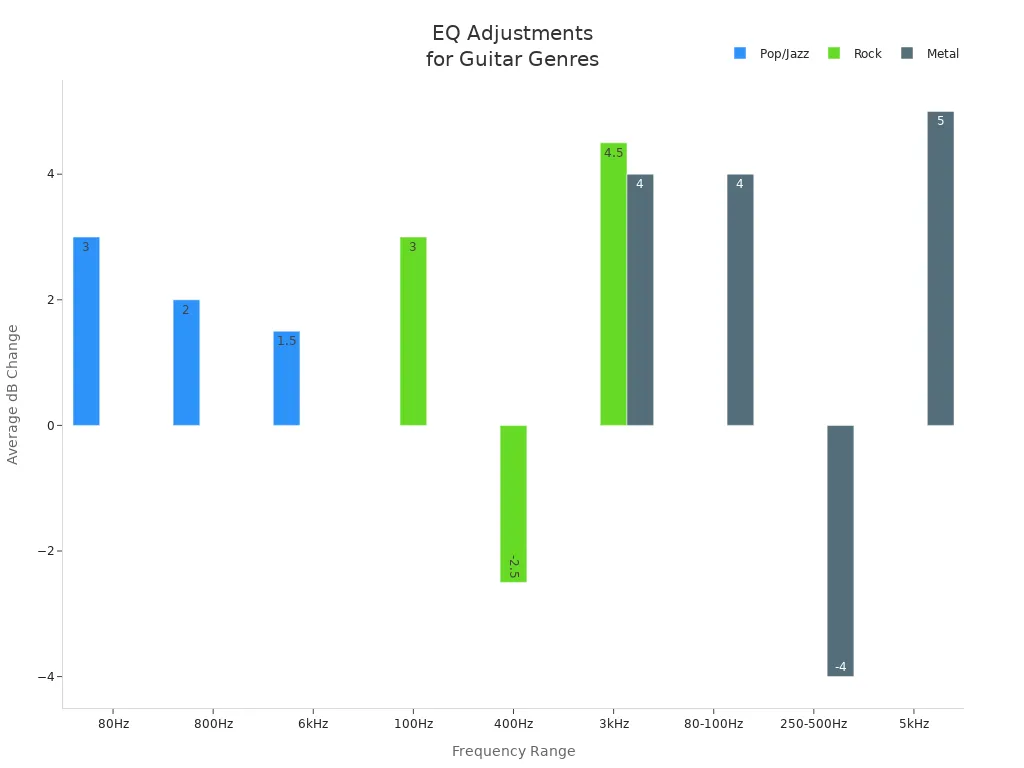
Different music styles need different EQ settings. The table below shows how to adjust EQ for pop, jazz, rock, and metal:
| Genre | Gama de frecuencias | Action | dB Change |
| Pop/Jazz | 80 Hz | Boost warmth | +2 to +4 dB |
| Pop/Jazz | 800 Hz | Boost tone richness | +1 to +3 dB |
| Pop/Jazz | 6 kHz | Boost clarity | +1 to +2 dB |
| Rock | 100 Hz | Boost depth | +2 to +4 dB |
| Rock | 400 Hz | Cut muddiness | -2 to -3 dB |
| Rock | 3 kHz | Boost edginess | +3 to +6 dB |
| Metal | 80-100 Hz | Boost low-end | +3 to +5 dB |
| Metal | 250-500 Hz | Cut muddiness | -3 to -5 dB |
| Metal | 3 kHz | Boost aggressiveness | +3 to +5 dB |
| Metal | 5 kHz | Boost sharpness for leads | +4 to +6 dB |
Musicians should remember the following key frequency ranges:
- 80–100 Hz: Boost low frequencies, but attenuate in specific areas to avoid muddying.
- 100–250 Hz: Boost tone fullness, especially for rhythm guitars.
- 300–800 Hz: Boost tone thickness; attenuation can achieve a modern, sunken tone.
- 800 Hz–2.5 kHz: Boost lead prominence.
- 2.5 kHz–8 kHz: Boost presence and clarity.
Avoiding Common Mistakes
Guitarists sometimes make mistakes when using equalizers. They might boost too many frequencies, resulting in a muddy or harsh sound. They might also equalize the guitar in solo mode, causing the guitar to clash with other instruments in the mix. Musicians should always listen to the guitar within the entire band and make subtle, careful adjustments. The smooth controls of the Musontek Remeowdel effects pedal help avoid these problems, allowing you to easily find the ideal balance for any musical style or occasion.
Final EQ Adjustments
Listening in Context
Guitarists should always listen to the guitar within the entire mix before making final EQ adjustments. The guitar’s sound changes when other instruments are playing simultaneously. Adjusting the volume of the guitar channel might make it sound brighter or darker. If the guitar volume increases, it might sound brighter.
Tip: Always check the guitar’s sound while the drums, bass, and vocals are playing. This helps find the optimal EQ settings for the entire song.
Musicians often use reference mixes to compare their sound to professional recordings. This helps them understand how each instrument should complement the others. They can use EQ charts as a starting point, but they should always trust their ears and adjust according to their own tracks.
Actionable EQ Checklist
A clear checklist helps guitarists finish their EQ process with confidence. Here are the key steps:
- Identify Issues: Listen for muddiness, harshness, or weak spots in the guitar sound.
- Reference the Mix: Play the guitar with all other instruments. Compare with a reference track if possible.
- Use EQ Charts: Check common frequency ranges for guitar. Use these as a guide, but adjust for your own sound.
- Make Technical Adjustments: Use a parametric EQ or a pedal like the Musontek Remeowdel. Focus on cutting problem frequencies first.
- Balance the Mix: Make sure the guitar sits well with drums, bass, and vocals. Adjust volume and EQ as needed.
- Fine-Tune: Make small changes. Listen again in the full mix. Repeat if necessary.
- Trust Your Ears: The final mix should sound good to most listeners, not just to one person.
Note: Each guitar track is unique. Always adjust EQ based on what you hear, not just what you see on a chart.
This checklist helps ensure a balanced, clear, and professional guitar sound in any mix.
EQ helps a guitar sound good and fit with other instruments. The main steps are cutting bad sounds, boosting for warmth or clarity, and listening with the whole band. Players should try different settings and trust what they hear. Using a checklist helps get the same results every time. Tools like the Musontek Remeowdel let players make fast and accurate changes.
- Subtractive EQ makes the guitar clear and stops muddiness.
- The Remeowdel keeps the guitar’s natural tone and lets you boost sounds.
- Using steps in order helps avoid mistakes.
How EQ Changes Guitar Sound:
- Removing unwanted tones keeps the guitar tone clear.
- Boosting certain frequency bands adds warmth and presence.
- A good EQ setting can make the entire mix sound better.
PREGUNTAS FRECUENTES
What does a 3-band EQ pedal do?
A 3-band EQ pedal lets players adjust bass, mid, and treble frequencies. They can boost or cut each band to shape the guitar’s tone. This helps the guitar fit better in any mix.
When should a guitarist use EQ?
Guitarists use EQ when they want to fix muddy or harsh sounds. They also use it to help the guitar stand out or blend in with other instruments. EQ works well in both live and studio settings.
How does the Musontek Remeowdel improve guitar tone?
The Musontek Remeowdel gives players precise control over their sound. Its analog circuit keeps the tone natural. The pedal’s true bypass protects the signal when off, while the JFET bypass adds a subtle harmonic boost.
What are common EQ mistakes to avoid?
| Mistake | Result |
| Boosting too much | Muddy or harsh sound |
| EQing in solo mode | Poor mix balance |
| Ignoring the context | Guitar clashes in mix |
Players should always listen in context and make small changes.



