




Compression pedal allow guitarists to play notes with greater sustain and achieve a more balanced volume across all notes. They maintain clarity in soft notes while toning down powerful ones, ensuring every sound is clear and audible. Musontek is committed to innovation and listens to the needs of musicians. Many musicians have consulted us for the optimal settings.
Wichtigste Erkenntnisse
- Compression effects help guitarists extend note duration and balance different volume levels.
- Start with simple settings. Set all knobs to the middle position. Adjust the threshold to -20dB. A 4:1 compression ratio provides good sustain.
- Effect placement is important. Place the compressor after the tuner to achieve optimal tone and sustain before other effects.
- Experiment with different attack and release settings to change the tone. A fast attack increases sustain, while a slow release maintains note resonance.
- Every guitar requires different settings. Adjusting the settings according to the type of guitar helps achieve the best tone and sustain.
Compressor pedal and sustain
How compressor boosts guitar sustain
A compression pedal helps guitarists sustain notes. When you play a note, the compressor detects the volume level. It reduces the volume of loud notes and amplifies the volume of soft notes. This is called compression. Compression makes the sound more balanced, and each note is clear and audible. Many guitarists use compression to better express soft notes without altering the tone.
Different compression pedals produce different effects. Optical compressors are suitable for smooth volume changes. FET compressors are suitable for powerful, forceful tones. VCA compressors offer a wide range of control options and are suitable for various musical styles. Tube compressors produce a warmer tone and are popular in blues and classic rock.
Here’s a brief overview of how each parameter affects sustain:
| Parameter | Beschreibung |
| Komprimierung | Makes loud parts softer and quiet parts louder. This helps notes last longer. |
| Attack | Decides how fast the compressor works. This changes how notes feel and last. |
| Release | Controls how long the compressor keeps working. This affects how long notes stay. |
| Makeup Gain | Balances the volume after compression. |
Country players use compression to make clean tones last longer. Bedroom pop musicians like pedals with one knob because they are easy to use. The Dyna Comp pedal is famous for its rich and long-lasting sound.
Why sustain matters for guitarists
Sustain gives guitarists better control over tone. When notes last longer, they sound smoother and fuller. Guitarists can shape solos and rhythms with more emotion. Sustain helps them play with more feeling and style. It also makes the guitar sound thicker in band performances or recordings.
Many modern guitarists consider compression effects very important. They help control rapid changes in sound and add tonal character. With the right effects and settings, musicians can create tone for any musical style. Musontek Dynamics – Super ZlP Factory effects help musicians find the optimal sustain and tone.
Compressor pedal setup
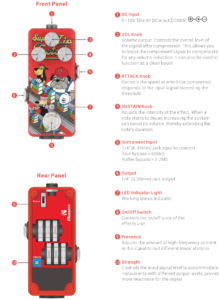
Guitar compressor settings
Setting up a compression pedal for sustain is actually quite simple, provided the steps are followed correctly. Many guitarists start by connecting the pedal to their guitar cable and setting all the knobs to the middle position. They’re aiming for a smooth, musical tone. Here’s a simple beginner’s guide:
- Connect the pedal to the guitar cable.
- Set the threshold, attack, and release knobs to the middle position.
- Adjust the threshold to approximately -20dB. This ensures the compression starts at an appropriate level.
- Set the compression ratio between 4:1 and 6:1. A higher compression ratio means stronger compression and longer sustain.
- Fine-tune the attack to approximately 10 milliseconds. This helps the pedal respond quickly to each note.
- Set the release knob to the middle position, typically around 100 milliseconds. This allows for longer note sustain.
- If the pedal has a mix control, you can mix in some uncompressed signal for a more natural tone.
- Listen and adjust the settings repeatedly until you achieve a satisfactory sustain.
Many guitarists start with these settings. They adjust compressor settings based on their playing style and the guitar they’re playing. Some effects also come with additional features, such as mixing or tone control. These features can help further shape the tone.
Here’s a table with common compressor settings for sustain:
| Einstellung | Suggested Range |
| Threshold | -10dB to -25dB |
| Attack | 1-10ms (fast), 10-100ms (slow) |
| Release | 50ms to several seconds |
| Ratio | 2:1 to 6:1 (light to moderate) |
Different guitars require different settings. Single-coil pickups produce the best tone with slight compression and reduced sustain. This allows for a richer tone without drastically altering it. Husophones have a stronger signal. Compression has a greater impact on them, so players should reduce sustain and increase mixing control. This maintains tonal balance and avoids over-compression.
Tip: Always listen to how the pedal changes the guitar signal. If the sound feels too flat or lifeless, try lowering the ratio or adjusting the attack and release. Every guitar and pedal is unique, so experimenting helps find the perfect tone.
Adjusting attack, release, and ratio
Attack, release time, and compression ratio are the main controls for shaping sustain. The attack knob determines how quickly the compressor responds to guitar notes. A fast attack results in a longer sustain and maintains the dynamics of the note. A slow attack maintains dynamism and gives the note more breathability.
Release time controls how long the compressor continues to operate after the note begins. A longer release time makes the note last longer. A shorter release time may cause the sound to fluctuate or decay too quickly.
Compression ratio determines how much loudness the compressor needs to attenuate. A higher compression ratio means stronger compression and longer sustain. A lower compression ratio maintains the naturalness of the sound.
Below is a table of recommended values:
| Einstellung | Beschreibung | Recommended Value |
| Ratio | Determines how much the signal is attenuated. Common values are 2:1, 4:1, 8:1. | 4:1 or 2:1 |
| Attack | Controls how quickly the compressor responds to the signal. A fast attack preserves transients, while a slow attack retains dynamics. | Fast for transients, Slow for dynamics |
| Release | Controls how long the compressor continues to work. A long release adds sustain, while a short release creates a pumping effect. | Long for sustain |
Many guitarists find that a fast attack and a slow release help extend the duration of notes. Balancing these settings is crucial. If the attack is too fast, the notes may lose momentum. If the release time is too long, the sound may become muddy.
- A fast attack is beneficial for increasing sustain.
- A slow release keeps the notes resonant.
- Adjusting the compression ratio changes the degree of compression.
Players should always listen and adjust according to their guitar and the song. Some songs require more sustain, while others need less. Proper compressor settings can make each note clear and powerful.
Compressor pedal in signal chain

Where to place compressor pedal
Many guitarists are not sure where to put the compressor pedal. Most pros put the compressor right after the tuner. This spot lets the compressor work on the guitar sound before other effects. The pedal works best when it handles the plain guitar sound first.
Here are some ways guitarists set up their pedals:
- Tuner → Compressor → Overdrive/Distortion → Modulation → Delay/Reverb
- Tuner → Compressor → Wah → Other Effects
Putting the compressor at the start keeps the volume even. It also makes the sustain better and more steady. Some players put the compressor after wah or overdrive pedals. This can help control big changes in volume from those effects.
Tip: Try putting the compressor in different spots. Listen to how each spot changes the sound and sustain. Musontek pedals work well anywhere, so you can try and find what you like.
Effects on sustain
The position of the compressor pedal affects the guitar’s tone. If the compressor is placed at the very front, it shapes the guitar tone before other effects pedals, resulting in a more even volume and longer sustain. This pedal makes soft notes louder and loud notes softer. The player will hear a warmer tone and longer sustain.
If the compressor is placed after a distortion effect, it makes the sound smoother and easier to control the output. Some guitarists like to use this effect in solos or strong rhythmic sections. This pedal helps maintain even volume and strong sustain.
The table below shows how different positions affect tone and sustain:
| Platzierung | Klangliche Merkmale | Sustain Impact |
| Start of chain | Natural, clear, balanced | Maximum sustain |
| After distortion/overdrive | Smooth, controlled, less dynamic | Enhanced, but less natural |
| After modulation | Subtle, less pronounced | Minimal effect |
The compressor pedal controls the guitar’s volume, making the sound more stable. It helps to extend note sustain and add warmth. It can soften loud sounds and make soft sounds louder. Players will notice smoother notes and more even volume, especially when plucking or strumming.
Most professional guitarists believe that putting the compressor first preserves the guitar’s original tone and feel. This allows the compressor to process the guitar before other effects alter its tone. Players achieve a stable, sustained, and less noisy tone.
Note: Every guitarist is different. The best spot depends on your music and gear. Musontek says to try different setups and listen for the sound and sustain you like best.
Compressor Pedal Tips for Different Styles
Lead guitar settings
Lead guitarists want their notes to be sustained and pleasing. They use the compression pedal to make solos smoother and clearer. Many players lower the threshold. This helps the pedal capture every subtle sound. A lower compression ratio, such as 2:1, maintains a natural tone. A slower attack makes the plucking sound clearer. A moderate release time maintains sustain without muddying the sound. Here’s a simple setup guide for lead guitar:
| Einstellung | Recommendation |
| Threshold | Set slightly lower to catch nuances |
| Ratio | Use a lower ratio, like 2:1 |
| Attack | A slower attack maintains note bite |
| Release | Medium release for smooth sustain |
| Ebene | Increase slightly above unity |
Players can try these settings to help their solos last longer. They can change the attack and release to match their style.
Rhythm guitar settings
Rhythm guitar needs to sound steady and even. Guitarists often use a moderate threshold and a higher ratio. This setup keeps chords tight and balanced. The compressor helps make the volume even. Every strum sounds clear. Here is a table for rhythm guitar settings:
| Guitar Type | Threshold Setting | Verdichtungsverhältnis | Purpose |
| Rhythm Guitar | Mäßig | Höher | Even out sound for consistency |
| Lead Guitar | Unter | Unter | Extra sustain without tone loss |
- Rhythm guitarists use moderate thresholds and higher ratios for a steady sound.
- Lead guitarists use lower thresholds and lower ratios for longer notes.
Players can start with these settings and listen for a full, even sound.
Acoustic guitar settings
Acoustic guitar sounds best when it stays bright and natural. A compressor pedal can help keep the sound crisp and smooth. Acoustic players set the threshold for 2-3 dB gain reduction. They use a gentle ratio, like 1.2:1 to 2:1. A start-up time of 20-50 milliseconds lets the pick attack come through. A release time of 100-200 milliseconds keeps the notes ringing. Here is a table for acoustic guitar:
| Einstellung | Recommendation |
| Threshold | 2-3 dB gain attenuation |
| Verdichtungsverhältnis | 1.2:1 to 2:1 for crisp sound |
| Start-up Time | 20-50 milliseconds |
| Release Time | 100-200 milliseconds |
- Set the threshold lower to catch soft playing.
- Use a gentle ratio for a natural sound.
- Try a slower attack and medium release for smooth notes.
Tip: Every guitar and player is different. Trying different compressor pedal settings helps find the best sound. Players can control how loud or soft their guitar is. They can also make their tone better and playing easier. Testing new settings can help you find your own style.
A compressor pedal helps guitarists make notes last longer and sound smoother. Players should begin with simple settings. Then they can listen and change things to fit their own style. Trying out different ways of playing, like chicken picking or making single-coil tones thicker, shows how the compressor changes the sound. Musontek thinks every player can find their best tone by testing new settings and using their ears.
| Technik | How It Helps |
|---|---|
| Funky Strumming | Makes notes last and keeps clean sounds clear |
| Clean Picking | Helps soft chords be heard |
| Solos | Adds more sustain for low output pickups |
FAQ
How does the compression pedal extend note sustain?
The compression pedal maintains a stable volume for each note. It enhances soft sounds and suppresses loud ones. This helps sustain each note and decay slowly, resulting in a longer sustain.
Where should the compression pedal be placed in the signal chain?
Most guitarists place the compression pedal after the tuner. This allows the pedal to shape a clean guitar tone before other effects. The player gets the best sustain and clarity here.
Which settings are best for beginners?
Tip: Set all knobs to the middle position (12 o’clock). Set the compression ratio to 4:1, the attack time to 10 milliseconds, and the release time to half. Listen carefully and adjust until you get the right sustain. Simple settings help beginners understand how the pedal changes tone.
Is the compression pedal suitable for acoustic guitars?
Absolutely! Acoustic guitarists use a soft compression effect. They set a lower compression ratio and a slower attack time. This keeps the sound natural and smooth. The pedals can help highlight soft notes without altering the guitar’s tone.



