



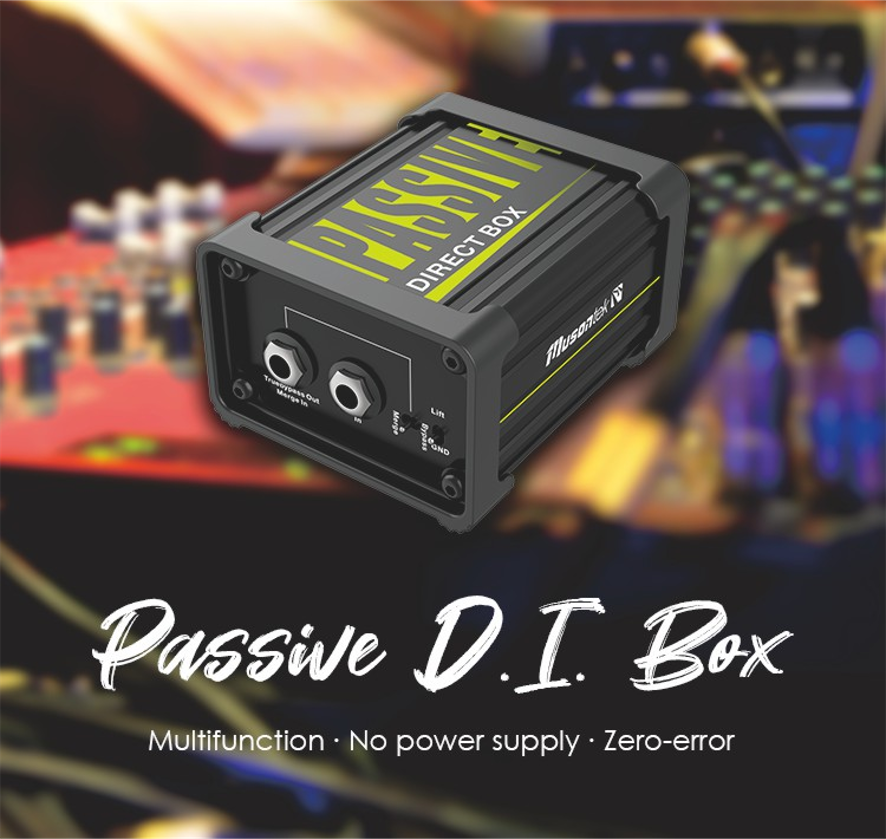
To set up a DI box for acoustic guitar, a person connects the guitar to the DI box, then links the DI box to a mixer or audio interface. This process works well for beginners and experienced musicians. Whether using a Passive ID BOX or an Active ID BOX—such as the Musontek Active ID BOX AD1F—the setup helps users achieve professional sound with simple steps. A DI box brings several benefits:
-
It changes the guitar’s signal so it matches sound equipment.
-
It removes noise and hum for clear audio.
-
It helps the guitar sound better through speakers and recording devices.
People can follow step-by-step instructions and avoid common mistakes for the best results.
الوجبات الرئيسية
-
Plug your acoustic guitar into the DI box with a good cable. This keeps your guitar sounding natural and gets it ready for mixing or recording.
-
Connect the DI box to a mixer or audio interface with an XLR cable. This cuts down on noise and lets you use longer cables without losing sound.
-
Change the DI box settings like ground lift and phase reverse switches. These help stop buzzing and make the sound better. Play your guitar and listen to check for a clear mix.
-
Pick the right DI box for your guitar’s pickup. Active DI boxes are best for passive pickups. Passive DI boxes work well with guitars that have built-in electronics.
-
Fix problems like buzzing or weak sound by checking all cables and using the ground lift switch. Setting up everything the right way gives you a great sound.
What is a DI box?

DI box basics
A DI box is important in music setups. It changes the guitar’s signal so it works with mixers. The DI box takes the guitar’s signal and makes it ready for microphones. This helps keep the sound clear and stops signal loss.
Musicians sometimes hear noise or hum when they plug in their instruments. The DI box helps fix these problems. It matches the signal and stops ground-loop hum. This gives a clean sound for playing live or recording.
A DI box has different parts that help the sound. Here is a table that shows the main types and what they do:
|
Component Type |
الوظيفة |
|---|---|
|
صندوق DI النشط |
Has an amplifier to keep the input safe from problems. |
|
صندوق DI السلبي |
Simple design, matches signals and does not need power. |
|
Transformer DI Box |
Uses a transformer for great isolation and no power needed. |
|
مفتاح الرفع الأرضي |
Breaks ground loops by disconnecting the XLR ground pin. |
The ground lift switch is very helpful. It stops ground loops by cutting the ground pin. This makes the sound cleaner and stops unwanted noise.
Why use a DI box for acoustic guitar
Musicians use DI boxes with acoustic guitars for many reasons:
-
Active DI boxes make weak signals stronger and clearer.
-
They lower noise and stop interference, even with long cables.
-
DI boxes work with lots of sound equipment for shows or recording.
-
They help match the guitar’s signal to the mixer for better sound.
-
It is easier to control feedback and fix sound problems with EQ.
Piezo pickups in acoustic guitars can sound harsh or strange when loud. A DI box helps fix this and makes the sound more natural. Magnetic pickups sound smoother, but a DI box still helps them work better. With a DI box, your acoustic guitar will sound great anywhere.
Choosing a DI box for acoustic guitar
Active vs. passive DI boxes
Picking the right DI box depends on your guitar’s pickup. DI boxes are either active or passive. Each type works best with certain guitars. Look at the table to see which DI box fits your guitar:
|
نوع صندوق DI |
Recommended For |
|---|---|
|
المبني للمجهول |
Active sources (like guitars with built-in electronics) |
|
نشط |
Passive sources |
Active DI boxes need power. They often get power from phantom power. These work well with passive pickups. Many acoustic guitars have passive pickups. Passive DI boxes do not need power. They are good for guitars with active electronics or preamps. Using the right DI box helps your guitar sound its best. It also stops signal loss.
الميزات الرئيسية التي يجب مراعاتها
A good DI box should help you get clear sound. The Musontek Active D.I. Box-AD1L is a great choice for acoustic guitar. It has features for live shows and recording. The table shows these features and why they matter:
|
الميزة |
المزايا |
|---|---|
|
مقاومة الإدخال العالية |
Keeps your guitar’s tone strong. |
|
مفتاح الرفع الأرضي |
Stops hum and makes sound clearer. |
|
مفتاح تبديل الطور العكسي |
Fixes phase problems for better mixing. |
|
Chain Port |
Lets you send sound to different devices. |
|
Wide Dynamic Range |
Handles loud and soft sounds without messing up the sound. |
Musicians should check what experts use when picking a DI box. The Musontek AD1L meets or beats many standards. Its special circuit and phantom power make it dependable. You can trust it for pro sound on stage or in the studio.
How to set up a DI box

Setting up a DI box for acoustic guitar helps musicians achieve clear and professional sound. The Musontek Active D.I. Box-AD1L offers features that make this process easy and reliable. Follow these steps to set up a DI box and get the best results.
Connect guitar to DI box
Musicians start by connecting the acoustic guitar directly to the DI box. The guitar usually has a built-in pickup system, such as piezo or microphone pickups. Use a standard instrument cable to link the guitar’s output jack to the input port on the DI box. This direct connection preserves the natural tone of the acoustic guitar and prepares the signal for mixing or recording.
نصيحة: Always use a high-quality cable to avoid unwanted noise and signal loss.
The Musontek AD1L features a chain port. This port allows players to send the guitar signal to other devices, such as amplifiers or effects pedals, while still routing the main signal to the mixer. This flexibility helps musicians shape their sound before it reaches the mixing console.
Connect DI box to mixer or interface
After connecting the guitar, musicians link the DI box to a mixer or audio interface. The Musontek AD1L uses a balanced XLR output for this step. Balanced signals travel longer distances without picking up noise, which is important for live performances and studio work.
Here is a simple guide to connect the DI box to a mixer or interface:
-
Plug the XLR cable into the DI box’s output port.
-
Connect the other end of the XLR cable to the mixer or audio interface’s input.
-
If using an amplifier, use the chain port or thru output to send the signal to the amp.
-
Toggle the ground lift switch if you hear hum or ground loop noise.
-
Make sure the mixer or interface provides phantom power. The Musontek AD1L uses phantom power to operate, so there is no need for batteries.
ملاحظة: Enabling phantom power ensures the DI box works every time. It keeps the signal strong and clear, reduces noise, and gives more headroom for loud or soft playing.
Adjust settings for best sound
Musicians adjust the DI box settings to get the best sound quality. The Musontek AD1L includes several switches and features that help with this process.
-
Use the phase reverse switch to flip the polarity of the DI signal. This prevents phase cancellations when mixing with other signals.
-
Toggle the ground lift switch to eliminate hum or ground loop noise.
-
If the sound feels muddy, use a high-pass filter on the mixer to roll off low frequencies. This makes the mix clearer.
-
Check the input impedance setting. The Musontek AD1L has a high input impedance, which keeps the guitar’s tone strong and natural.
|
Setting |
Purpose |
|---|---|
|
مفتاح الرفع الأرضي |
Removes hum and ground loop noise |
|
مفتاح تبديل الطور العكسي |
Prevents phase cancellation in the mix |
|
Chain Port |
Sends signal to amp or pedals |
|
Phantom Power |
Powers the DI box for strong, clear signal |
Musicians should test the sound by playing the guitar and listening through the mixer or speakers. Adjust the settings until the sound is clean and balanced. The Musontek AD1L makes it easy to set up a DI box and solve common problems.
🎸 Setting up a DI box with these steps helps every acoustic guitar sound its best on stage or in the studio.
Troubleshooting and tips
Fixing noise and hum
Noise and hum can ruin a good guitar show. These problems happen for a few reasons:
-
Plugging gear into different outlets can cause grounding problems.
-
Phantom power can sometimes add extra noise.
-
If phantom power goes to the wrong place, buzzing may start.
-
Long cables can pick up unwanted sounds.
Musicians can fix many of these issues by checking their setup. Plug all gear into one outlet to stop ground loops. Adjust phantom power on the mixer to lower noise. If you still hear buzzing, try the ground lift switch on the DI box. The ground lift switch cuts the ground link between the DI box and other gear. This can stop ground loops and make the hum go away.
Solving signal issues
Sometimes the sound is weak or drops out when using a DI box. The phase reverse switch can help with phase problems, especially when using a mic and DI signal together.
“Flipping the polarity of one signal can help stop phase problems when mixing a DI signal and a mic signal from an acoustic guitar.”
Musicians should check all cables and make sure the DI box gets phantom power if it needs it. Keeping the DI box close to the guitar helps stop signal loss from long cables.
Tips for clean sound
Getting a clean sound starts with good habits. Using a DI box with an acoustic guitar helps lower noise and makes the sound better. Musicians should check signal levels for both live shows and recording:
-
Set gain high, but not so high it clips.
-
Watch the clip lights and adjust the source first.
-
Keep gain balanced through all the gear.
Doing these things helps keep the sound strong and clear. Musicians who set up a DI box the right way and use its features, like ground lift and phase reverse, get pro sound every time.
Musicians use easy steps to set up a DI box with acoustic guitar. First, they connect the guitar to the DI box. Next, they link the DI box to a mixer. Then, they change settings to get a clear sound. The Musontek AD1L has features that let users try different tones. Troubleshooting helps fix problems and makes the sound better.
-
A DI box gives many long-term benefits:
-
Low impedance connections keep sound clear with long cables.
-
Balanced lines help stop noise and interference.
-
Signal conversion makes the sound quality better.
-
Professional engineers say to start with a flat EQ. This helps you hear the guitar’s real sound. They change the EQ to fix problems and make the guitar sound fuller. Musicians who use these features get great, pro-level sound every time. 🎶
الأسئلة الشائعة
How does a DI box improve acoustic guitar sound?
A DI box changes the guitar’s signal to match mixers and audio interfaces. This process reduces noise and hum. Players get a cleaner, more natural sound, especially when using long cables or playing live.
Can the Musontek AD1L work with any acoustic guitar?
Yes, the Musontek AD1L works with most acoustic guitars. It handles both passive and active pickups. Its high input impedance keeps the guitar’s tone clear and strong.
What does the ground lift switch do?
The ground lift switch breaks the ground connection between the DI box and other gear. This action helps stop ground loop hum and buzzing noises during performances or recording.
Do I need phantom power for the Musontek AD1L?
The Musontek AD1L needs phantom power to operate. Most mixers and audio interfaces supply 48V phantom power through the XLR cable. No batteries are required.
How can I connect an amp and a mixer at the same time?
Players can use the chain port on the Musontek AD1L. This port sends the guitar signal to an amplifier while also sending a balanced signal to the mixer or interface.



