




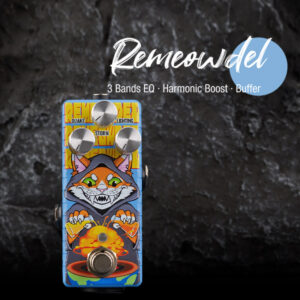
Want your distorted bass to cut through the mix? Try cutting around 500Hz and boosting the treble for more clarity. Reach for a quality equalizer guitar effect pedal like the Musontek ريموودل. You can shape your bass guitar tone with precision and avoid muddiness. Always listen to your bass in context so it sits well with other instruments. Remember, a buffer guitar pedal helps keep your signal strong and clean, especially when you push your bass for extra grit.
الوجبات الرئيسية
-
Cut around 500Hz to reduce muddiness in your distorted bass. This helps your sound stay clear and punchy.
-
Boost treble frequencies between 8,000 Hz and 12,000 Hz for added brightness and presence in your bass tone.
-
Blend a clean DI signal with your distorted bass to maintain power while adding aggression. This keeps your sound clear in a busy mix.
-
Experiment with the placement of your equalizer pedal. Placing it after distortion allows for better control over your final sound.
-
Avoid over-EQing. Focus on cutting unwanted frequencies instead of boosting too many to maintain a natural bass tone.
Bass in the Mix
Defining Your Bass Tone
When you start shaping your distorted bass, you want to think about how it fits with the rest of the mix. Every mix needs a strong foundation, and the bass gives you that. In rock and metal, distorted bass helps you cut through a wall of guitars. You get a gritty, biting sound that stands out. Sometimes, you want fuzz for a thick, vintage vibe. Other times, you want distortion for more aggression. Overdrive can add warmth without making things too harsh.
Here’s what you’ll notice in a well-EQed distorted bass:
-
Fuzz adds thickness and compression.
-
Distortion brings grit and helps the bass punch through the mix.
-
Overdrive gives you warmth and keeps the original tone.
-
You might hear a boost around 80Hz for more low-end presence.
-
Mids between 120 and 350Hz shape the character of your bass.
-
Rolling off high frequencies can make the bass tighter and cleaner.
You can also blend a clean DI signal with your distorted sound. The clean part keeps the weight and power, while the distortion adds aggression and makes the bass more audible in the mix. This blend helps you keep clarity, even when the mix gets busy.
Setting Mix Goals
Before you start mixing, ask yourself what you want the bass to do in your mix. Do you want it to lock in with the kick drum and give the mix a solid base? Or do you want the bass to stand out with a lot of grit and attitude? In metal, the bass often works with the kick drum to hold everything together. You might boost around 80-100Hz to make the bass feel strong, and cut around 200-250Hz to avoid muddiness.
Applying serious distortion to a bass guitar can lead to a loss of clarity and punch. A common solution is to split the bass into two frequency bands, allowing for independent processing of lows and highs.
Many producers split the bass into two tracks. One track stays clean for the low end, and the other gets distorted for the mids and highs. You can blend these tracks to taste. This way, you get a bass sound that is clear, powerful, and fits perfectly in the mix. When you set your mix goals, think about how the bass interacts with the other instruments. Try different blends and EQ moves until the bass sits just right in the mix.
Equalizer Guitar Effect for Bass
Pedal Setup and Signal Chain
When you want to shape your distorted bass, the placement of your equalizer guitar effect pedal matters. You usually put the pedal after your distortion or overdrive. This way, you can fine-tune the sound and make your bass stand out. If you place the equalizer guitar effect before the distortion, you can change how the distortion reacts to certain frequencies. Try both setups and listen for the difference. You might notice that lowering mids and boosting highs gives your bass a modern, thick tone.
Here are some tips for setting up your signal chain:
-
Put the equalizer guitar effect after your drive pedals for more control over your final bass sound.
-
Experiment with pedal order to find unique tones.
-
Use the pedal’s true bypass feature to keep your signal clean when the effect is off.
A high-quality pedal like the Musontek Remeowdel gives you more options. It supports a wide voltage range, so your bass stays clear even with high output.
Adjusting EQ Bands
Now, let’s talk about dialing in your tone. The Musontek Remeowdel has three bands you can adjust. Each band lets you boost or cut up to +15 dB, so you get plenty of flexibility. You can make quick changes with the simple design, which is great for live shows.
Here’s a table showing what sets a top equalizer guitar effect apart:
|
الميزة |
الوصف |
|---|---|
|
Sound Transparency |
Clean sound, no unwanted noise, better overall bass tone. |
|
Boost Range |
Big boost range for more tonal options. |
|
Analog Circuitry |
Warmer, natural sound for your bass. |
|
Design Simplicity |
Easy to use, quick control over your bass sound. |
The Remeowdel uses analog circuitry with JFET and true bypass. True bypass keeps your signal pure when the pedal is off. JFET adds a touch of harmonic richness, making your bass sound fuller.
When you adjust the EQ bands, start by cutting muddiness around 500Hz. Boost the highs for clarity. If your bass feels weak, add some low end. Always listen in context and tweak until your bass fits the mix.
Best Equalizer Settings for Bass
Cutting Muddiness (500Hz and Below)
Distorted bass can sound muddy if you don’t control the low-mid frequencies. You want your bass guitar eq to sound clear and punchy, not like a blanket over your mix. The best equalizer settings for bass start with cutting muddiness. Here’s what you can do:
-
Lower the EQ around 250Hz to clean up the mix.
-
Use a bell filter to reduce frequencies from 300Hz to 600Hz.
-
Cut low-mids between 200Hz and 600Hz for more clarity.
If you notice your bass guitar eq settings sound thick but lack definition, try reducing these areas first. You’ll hear the bass pop out more, especially when you play with drums and guitars. Most players find that cutting these frequencies helps the bass guitar eq sit better in rock, pop, and electronic music. You can use the Musontek Remeowdel pedal to dial in these cuts quickly. The smooth control knobs make it easy to find the sweet spot.
Tip: Always listen to your bass in the full mix. Soloing the bass guitar eq can trick your ears. The real test is how it blends with everything else.
Boosting Presence and Treble
You want your bass to have bite and sparkle, especially with distortion. Boosting the right treble frequencies gives your bass guitar eq more presence. The best equalizer settings for bass often include a gentle boost in the highs. Try these steps:
-
Boost treble between 8,000 Hz and 12,000 Hz for brightness.
-
Cut mid-treble from 6,000 Hz to 10,000 Hz to avoid harshness.
-
Use the Remeowdel’s high band to add clarity without making the sound sharp.
If you push the treble too much, your bass guitar eq can sound harsh. This can tire out listeners and mess up the mix balance. You want enough presence so the bass stands out, but not so much that it hurts your ears. Many listeners love the emotional punch of distortion, but they also want a smooth, exciting sound. Try boosting a little, then listen to the whole mix. If it feels too aggressive, dial it back.
Note: In studio recordings, you can get more precise with your eq settings. For live shows, you might need to adjust for the room. Save different presets for each situation so you can switch fast.
Managing Low End and Dry/Wet Blend
The low end is the foundation of your bass guitar eq. If you let distortion take over, the mix can get messy. You want to control the lows so your bass feels strong but not overpowering. Here’s how you can manage the low end:
-
Scan the full low-end with your eq and look for boomy spots.
-
Use dynamic EQ to control loud resonances.
-
Sidechain the bass to the kick drum for a tighter mix.
-
Sweep through the low frequencies and adjust the threshold to tame excess energy.
Some pedals and plugins let you blend the dry and wet signals. This means you can keep the clean power of your bass while adding distortion for character. Try blending a clean signal with your distorted bass guitar eq. You’ll get punch and clarity at the same time. Many producers use this trick in rock and electronic music. It helps the bass guitar eq stay strong without losing definition.
Pro Tip: Create two presets for your bass guitar eq settings—one for studio and one for live gigs. Studio presets can be brighter and more detailed. Live presets should focus on cutting through the venue’s acoustics.
Here’s a quick table to help you remember the main points:
|
EQ Move |
نطاق التردد |
Result |
|---|---|---|
|
Cut Muddiness |
200Hz – 600Hz |
Clearer, punchier bass |
|
Boost Presence |
8,000Hz – 12,000Hz |
Brighter, more defined sound |
|
Control Low End |
40Hz – 120Hz |
Strong, balanced foundation |
When you set your bass guitar eq, always think about the genre and the listener’s taste. Distortion brings energy and emotion, but you need balance. The right eq settings make your bass guitar eq sound powerful and exciting, whether you’re on stage or in the studio.
Bass Guitar EQ Tips and Mistakes
Avoiding Over-EQing
You might think more eq means a better bass sound, but that’s not always true. Overusing eq can make your bass sound unnatural and even cause phase issues. Many mix engineers suggest you use eq sparingly. Focus on cutting problem frequencies instead of boosting everything. If you boost too many frequencies, you can end up with a mix that sounds loud but messy. Try using a reference track to check if your eq’d bass actually improves your mix.
Here are some common mistakes to watch out for:
-
Making big boosts on every track
-
Ignoring phase problems in the low end
-
Boosting mids and highs without checking the whole mix
-
Forgetting to use subtractive eq for clarity
If you want a clean low-end, start by removing what you don’t need. Subtractive eq helps your bass sit better with other instruments. You can always add a little boost later if you need more presence or tone.
Balancing with Kick Drum
Getting the bass and kick drum to work together is key for a solid mix. The low frequencies from both can clash and cause masking. You want to make space for each instrument. Try cutting some low frequencies from the kick drum, especially around 80 Hz, to let the bass fundamental breathe. Check the 100-300 Hz range on your bass and see if a gentle cut helps the kick stand out.
You can also use sidechain compression. This technique ducks the bass when the kick hits, so both stay clear. Boost the attack of the kick around 2-4 kHz and the body near 60-100 Hz. For the bass, enhance the sub-bass from 20-60 Hz and add some upper harmonics between 1-2 kHz. This approach helps with balancing bass and guitars, especially in dense mixes.
Experimenting for Unique Tones
Don’t be afraid to try new things with your bass eq. Every song and mix is different. You might find that a small boost in the mids or a touch of distortion creates a unique tone. Focus on the mids and highs for presence. A gentle boost between 1-5 kHz can help your bass cut through. Adding a bit of analog distortion can bring out harmonics and make your bass more exciting.
Experiment with advanced bass eq techniques like blending clean and distorted signals. This trick gives you punch and clarity. Try different pedal settings and listen in context. Balancing bass and guitars sometimes means breaking the rules. Advanced bass eq techniques can help you find your own sound. Remember, the best tone comes from experimenting and trusting your ears.
Tip: Save your favorite eq settings as presets. You can switch quickly between tones for live shows or studio sessions.
You now have the tools to shape your bass with confidence. Start by using a high pass filter to clean up the low-frequency spectrum. Reach for dynamic eq to control problem spots and keep your bass clear. Remember, your pedal choice matters. The right equalizer pedal helps you manage bass in any mix. Try different dynamic eq settings and listen on small speakers. Check your bass often and adjust dynamic eq as your mix changes. Avoid boosting too much, and let your bass shine.
-
Always revisit your dynamic eq moves.
-
Listen for bass clarity on different speakers.
-
Don’t be afraid to experiment with your bass tone.
الأسئلة الشائعة
How do I stop my distorted bass from sounding muddy in metal?
You can use a low pass filter to clean up the high end. Try cutting around 500Hz with your eq. This helps your bass sound clear and punchy in metal. Listen in context with guitars and drums.
What’s the best way to blend clean and distorted bass for modern metal?
Start with a dry/wet blend. Use a low pass filter on the clean signal. Add distortion to the high end. This gives you power and clarity. Many modern metal bands use this trick for a tight, aggressive sound.
Should I use a low pass filter on my bass in metal productions?
Yes, you should. A low pass filter removes harsh highs. This keeps your bass smooth and focused. It works well in metal productions, especially when you want the bass to sit under heavy guitars.
What eq strategies for mixing work best in modern metal?
You want to cut muddiness and boost presence. Use your eq to carve space for the kick drum. Try a low pass filter to control fizz. These eq strategies for mixing help your bass punch through in modern metal.
How do I get my bass to cut through in modern metal mixes?
Boost the upper mids and treble. Use a low pass filter to tame harshness. Make sure your bass sits with the kick drum. Modern metal needs a bass sound that is clear, aggressive, and powerful.



